Building
Code mode & files
The canvas between your project’s files and an editor, the Files view, and edits from anywhere that merge.
Everything sitereal builds is a file you can read, and code mode puts those files beside the canvas: change a page in its markup and watch the canvas follow, or click an element and see the line that writes it.
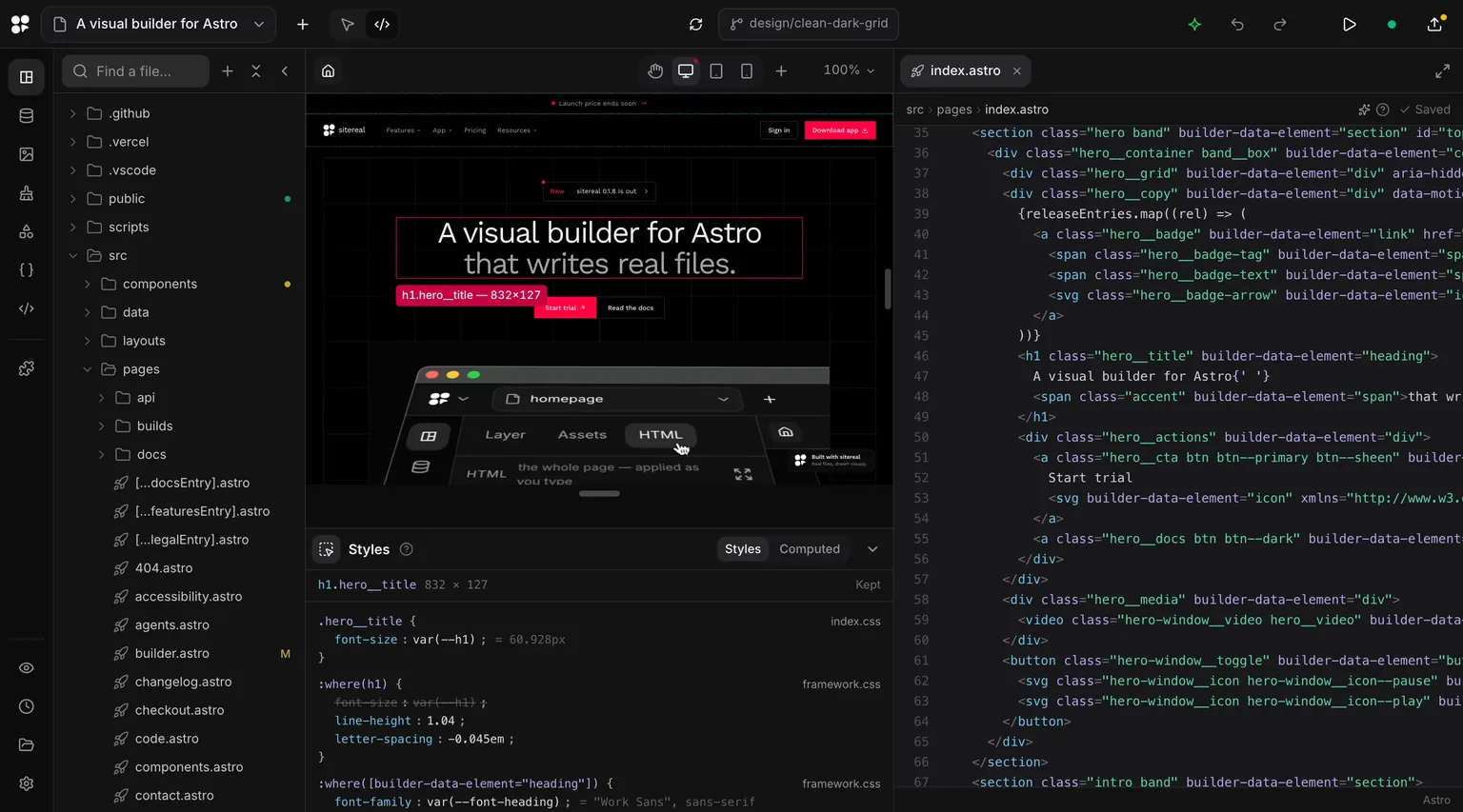
Switching to code
The switch sits in the top bar, beside : Design is the layers and the style panels, Code is the project’s files around the canvas. It is the same page either way — switching changes what is around it. ⌘K → Code mode does the same.
| Column | Shows |
|---|---|
| Files | The whole project as a tree, with a search at its head and a for a new file or folder. A file git would commit carries git’s letter, and every folder above it a dot. ⌘B hides the tree; the folder button in the corner brings it back. |
| Canvas | The open page, component, template or pop-up — live, following the editor as you type. Under it, the Styles pane. |
| Editor | The open file, in tabs. The button at the end of the tabs gives it the whole width. |
Opening a file
What a click in the tree opens depends on what the file is:
| File | Opens |
|---|---|
| A page, a component, a template’s layout, a pop-up | That document on the canvas, and its file in the editor. |
| A stylesheet | The file, with the canvas left where it is — a stylesheet is previewed by what it styles. |
| A picture, a video, an SVG, Markdown or HTML | A preview over the canvas, drawn from what you type. |
Anything else — a config, a script, .env | The editor, across the canvas’s width, since there is nothing to preview. |
Tabs belong to the editor: going back to a tab never moves the canvas. What the canvas shows is chosen in the tree, the page switcher or Assets — and the other way round, a page opened from the page switcher brings its file to the front.
Click an element on the canvas and the editor scrolls to the tag that writes it and lights it, leaving the keyboard where it was. The canvas names elements the way the file writes them: h1.hero__title, <VideoShowcase>.
Typing
There is no Save button. A pause in the typing saves the file, and the canvas shows the change about half a second after your last key; ⌘S saves at once. Undo is per file: ⌘Z in a tab undoes that file, and each file keeps its steps for as long as the window is open — after you switch tabs, and after you leave code mode.
Half a tag is not an error. Until the file reads, the canvas keeps what it had and the editor says Saved, not on the canvas yet; finish the tag and the canvas follows. Where a file does not parse, the line is marked in the strip under the editor — never the line you are typing on.
The editor also says what the languages themselves forgive in silence: a missing semicolon, a property or a value the browser does not know, a brace left open. Each is listed under the editor with its line, and a click puts the caret there.
site.siterealis shown and never written from here: the engine is its only writer..envopens like any other file for you, and is refused to an agent connected over MCP, so a key never lands in its transcript.
Inspecting the canvas
The Styles pane under the canvas reads an element the way a browser’s developer tools do. Point at one and the canvas draws its box model — margin, border, padding, content — with a card naming its size, color, font and spacing. The pane lists every rule that applies, strongest first: a declaration a stronger rule beats is struck through, and a variable shows what it comes out as. Pseudo-elements, states like :hover and inherited values are folds of their own, and Computed draws the box model. A rule’s file name opens that file at the rule.
The icon at the head of the pane switches hover inspecting off: the canvas is then just a page to scroll, and the pane reads the element you last clicked. The bar above the pane folds it away and brings it back; drag it for more room.
The Files view
Files in the rail is the same editor without the canvas: the tree, the tabs, saving as you type, undo per file, and a preview for pictures, video, SVG, Markdown and HTML. It keeps tabs of its own, so what is open there and in code mode never mix. When the build dot in the top bar turns red, a click opens Astro’s error here, at its line.
Edits from anywhere
A change typed here is a hand edit, exactly like one saved in VS Code or written by an agent, and all three take the same road: sitereal reads the file back a moment later and the canvas follows. Nothing is asked.
When the canvas and the file both changed, the two are merged line by line and both land. Where both changed the same line, the edit in the file wins — it is the newest thing somebody did on purpose — and the canvas’s version is one ⌘Z away.
What the canvas cannot show stays in the file. A tag you added to the head or a value on <Base> is kept, and later canvas changes merge around it; a property you add to a component’s Props becomes one of its properties. A rule written into the generated framework.css moves into global.css by itself a few seconds after you stop typing, because framework.css is rewritten from the design system.
Deleting a file by hand deletes what it was: a page’s file takes the page with it — History keeps it — and an entry file takes its entry. Any other file sitereal generates is written again, since something is built from it.
When a file is not on the canvas yet — it does not parse, or it says something only a setting can — the top bar shows 1 not on canvas. Its list opens each file here at the line to look at, and the file stays exactly as you wrote it in the meantime.