Interaction
Motion
data-motion, springs, scrubs, scroll links, ambient motion and the runtime that reads them.
An animation is an attribute on the element. data-motion="rise" is the whole of it, and everything else overrides what that name already means.
<section builder-data-element="section" data-motion="rise" data-motion-stagger="90">Nothing that repeats a default is written, so the markup stays short and hand-editable — and an element pasted into another project animates there too.
The presets
| Preset | Does |
|---|---|
fade | opacity only — the quiet one |
rise | fades in from below |
sink | fades in from above |
slide-right | enters from the left |
slide-left | enters from the right |
zoom | grows into place |
pop | small, then overshoots |
blur | focus pulls in |
tilt | rights itself as it arrives |
flip-x | turns in about the vertical axis |
flip-y | turns in about the horizontal axis |
skew | leans in and straightens |
custom | nothing preset — say it yourself |
The overrides
| Attribute | Means |
|---|---|
data-motion-duration | ms |
data-motion-delay | ms |
data-motion-ease | smooth out in-out bouncy linear, or any curve of your own |
data-motion-spring | stiffness damping mass — the transition, instead of ease and duration |
data-motion-opacity -x -y -scale -rotate -blur | where it comes from |
data-motion-rotate-x -rotate-y -skew-x -skew-y | the 3D turns and skews, drawn through --motion-perspective |
data-motion-exit-* | the same keys, for where it leaves to |
data-motion-trigger | load (Appear) or scrub (held at the scroll position); absent is in view |
data-motion-start | how far into the viewport (% of its height) before it fires |
data-motion-once | false = it plays again on the way back |
data-motion-direction | down plays only while scrolling down; absent is both |
data-motion-stagger | ms between children — the box does not animate, its children do, in turn |
Springs
A spring is three numbers — stiffness, damping, mass — solved into a real CSS linear() easing, so the page needs no physics engine and the curve survives being pasted into a stylesheet.
Its duration is a result, not a fourth setting: 400 30 1 settles in 460ms, and the panel says so. The graph you look at while tuning and the animation that ships are the same spring by construction.
Scroll links
A reveal and a scroll link are different things, and they say so with different attributes:
<img builder-data-element="image" data-scroll-speed="0.15" />| Attribute | Means |
|---|---|
data-scroll-speed | how much slower than the page — 0.15 is a sixth behind; negative leads |
data-scroll-rotate | degrees across the whole range |
data-scroll-scale | scale added across the whole range |
data-scroll-start / -end | the stretch of scroll it runs over: the element’s center against the viewport, 100 the bottom edge, 0 the top |
A reveal has a start, an end and a hidden state. A scroll link has none of those — it is only where the element sits given where the page is. One element can carry both, and they do not fight over CSS either: the reveal writes the individual translate / scale / rotate properties, the scrubber writes transform, and the browser composes the two.
Ambient motion
data-ambient="float" is the motion that never stops: the badge that floats, the arrow that nudges, the ring that turns. Presets are float, bounce, drift, pulse, sway, spin and glow, each with an amount and a duration you can override. An element that also reveals starts its ambient pass once it has arrived, and reduced motion switches it off.
The runtime
public/scripts/motion.js, emitted automatically for the pages that need it:
- IntersectionObserver for reveals, a
requestAnimationFramescrubber for scroll links and scrubs, the Web Animations API for ambient passes. - State in inline styles, so nothing fights your stylesheet.
prefers-reduced-motionhonored.- One run per document, however many copies of the script arrive.
It is JavaScript-first on purpose — never CSS view() / scroll() timelines, because an overflow: clip ancestor traps them and a pinned section freezes them.
No flash
A few hundred inline bytes in the head arm the document and write their own hide rule — not the design system's, because a project with the design system off must not flash. The runtime disarms them once it holds the hiding in inline styles, and they disarm themselves after 2.5 seconds if the runtime never arrives.
A page that fails to animate is a page. A page that stays invisible is nothing. That is why the guard has a timeout.
Tokens
The values in Design → Motion say what animation is like on this site:
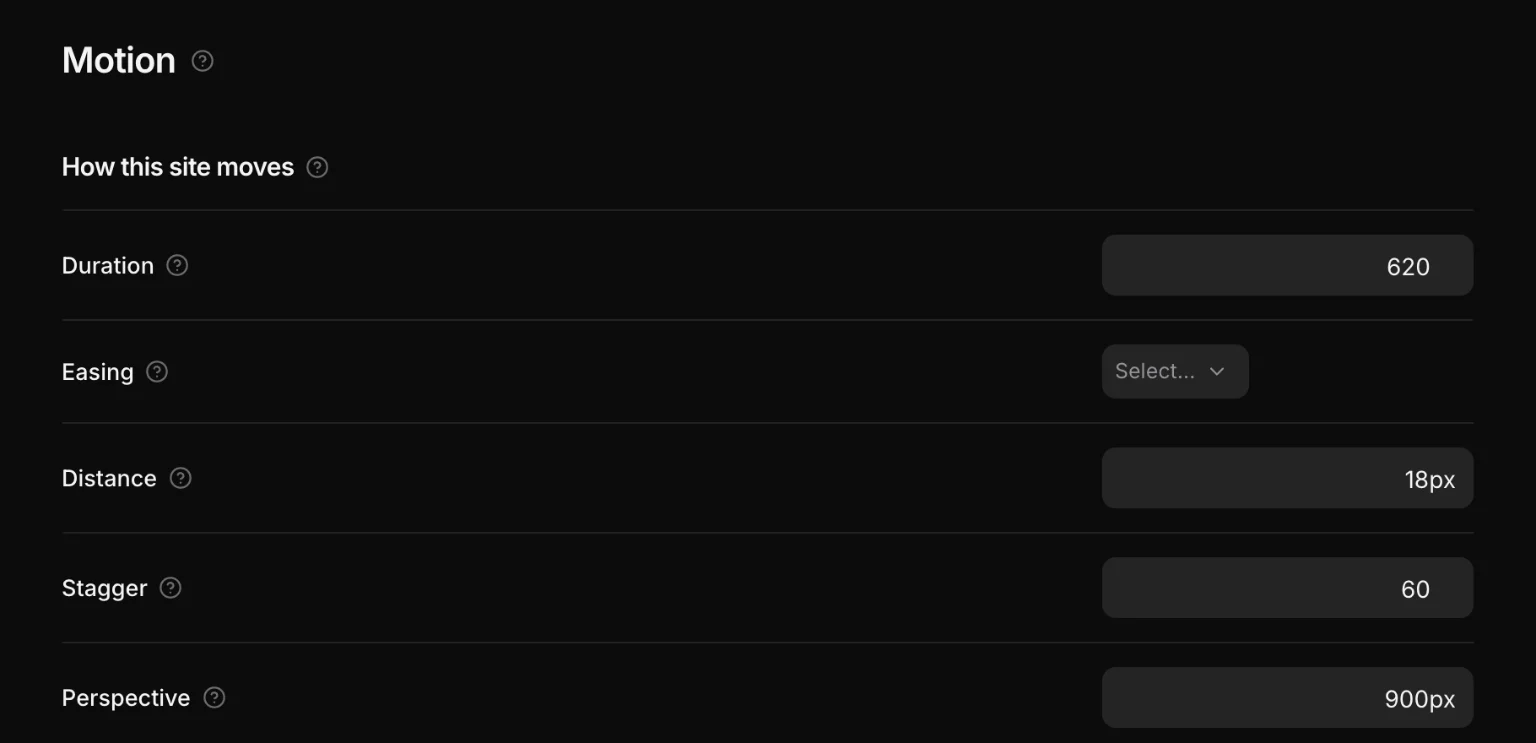
--motion-duration: 700ms;
--motion-ease: cubic-bezier(0.16, 1, 0.3, 1);
--motion-distance: 32px;
--motion-stagger: 90ms;
--motion-perspective: 900px;
The runtime never reads them in JavaScript. They go into the inline transition / translate as var(--motion-…, fallback), so the module can be off, the design system can be off, and an element still animates — it just stops having an opinion.
On the canvas
On the canvas the page is the page: a reveal plays as you scroll to it and an Appear plays when the canvas loads. What is already on the screen stays there while you edit, and in the top bar reloads the canvas and plays the page from the top.