Building
Pages & routes
Creating pages, routes, titles, the page tree and page-level settings.
A page is a route, a title, a tree and its own stylesheet. Everything else about it — what wraps it, what tokens it can spend, what scripts it loads — comes from the project.
Routes
A page's route is its file. about is emitted as src/pages/about.astro and served at /about; docs/intro becomes src/pages/docs/intro.astro and /docs/intro.
One page is the homepage, chosen under Settings → General. That page is emitted as index.astro and drops its own slug; the page that used to be the homepage gets its slug back on the same save.
Renaming a route moves the page and its files together. Nothing is left behind pointing at the old name.
Creating and switching
Page at the top left is the page switcher: search your pages, jump to one, or choose New page…. A new page starts empty, with one stylesheet, and is written to disk straight away.
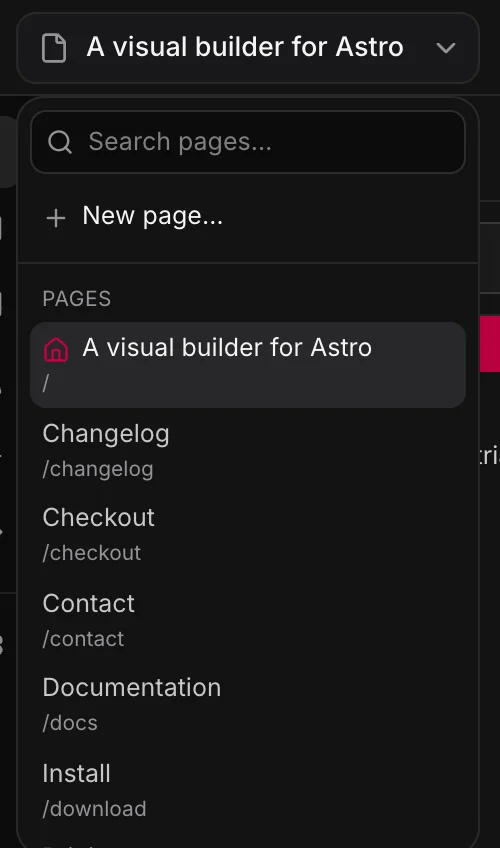
The page tree
What you build becomes the <main> of the emitted file:
---
import Base from '../layouts/PlainBase.astro';
import '../styles/generated/framework.css';
import '../styles/generated/pages/about.css';
---
<Base title="About" description="Two people, a lot of opinions about CSS.">
  <main>
    <section builder-data-element="section" class="about">…</section>
  </main>
</Base>
If a template applies to the route, the template's tree supplies everything around that <main> — see Templates. Without a template, the page is emitted on its own.
Page settings
With nothing selected, the panel on the right is the page’s own settings — and the gear that appears on the page’s name in the trail above the canvas opens them from anywhere. Settings → Pages has the same fields for every page in one place — the quickest way to find the one still missing a description:
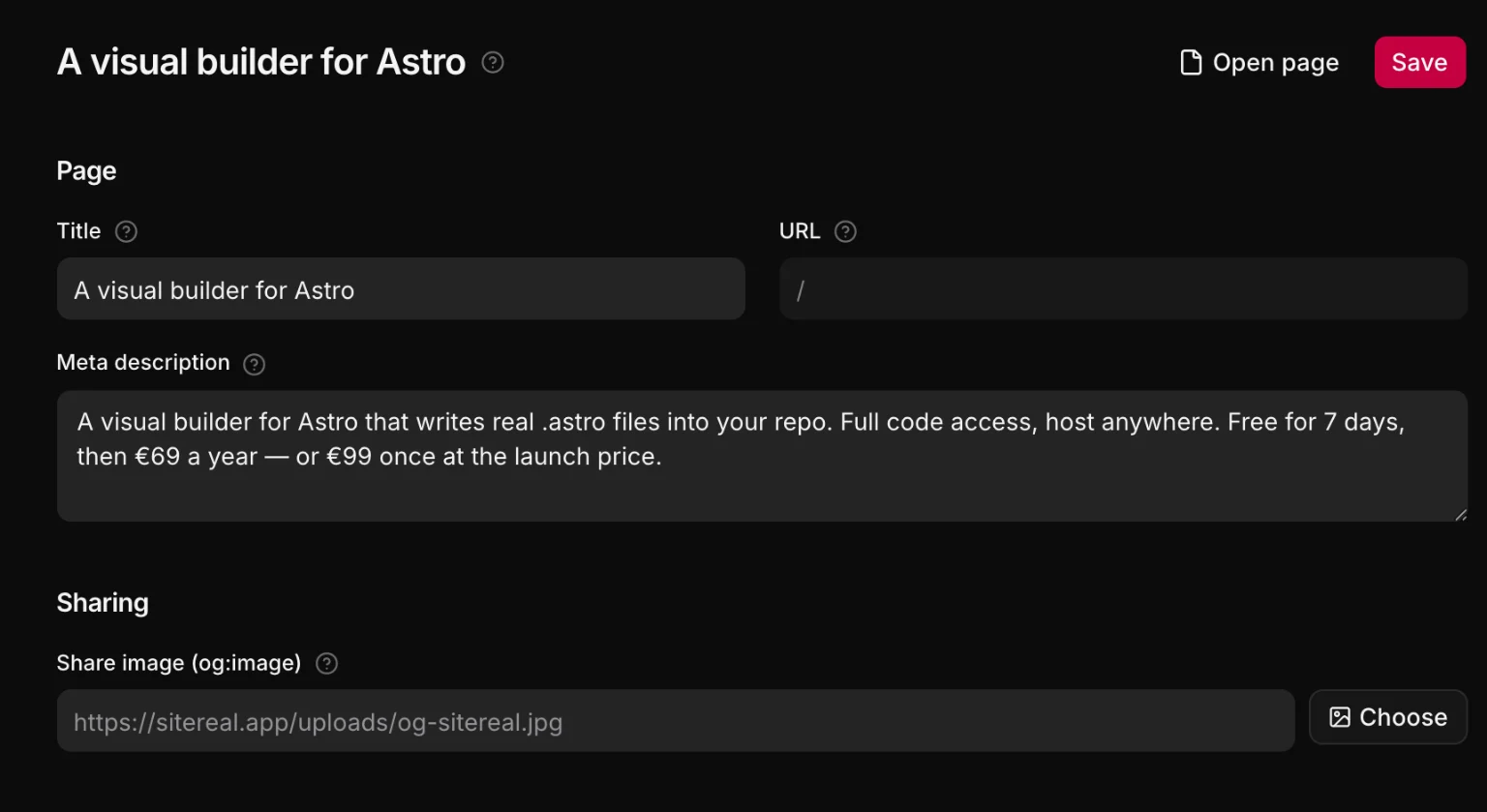
- Title — the page's own words. The document title is built from the template in Settings → SEO (
%sis this title,%sitethe site name), so you never retype the site name per page. - Description — one sentence, used for
<meta name="description">and the social card. - Share image — overrides the site default for this page.
- Hidden from search — emits
noindex, nofollowand drops the page from the sitemap. - Draft — keeps the page off the site until you set it live. See Drafts below.
Nothing that was left empty is emitted. An empty <meta> is worse than none, because a crawler believes it.
Drafts
A page can be a draft. It stays in the page switcher and on the canvas, where you edit and preview it as usual, but the site is built without it until you set it live. Turn on Draft in the page settings, or pick it under Status in Content → Pages. The page then shows an amber Draft badge, and Set live beside it puts the page back on the site.
- The file name says it. A draft is written as
src/pages/_about.astroinstead ofabout.astro. Astro leaves out every page whose file name starts with an underscore, so the build skips a draft on its own, and the site builds the same without sitereal. - It is left out everywhere. The sitemap and site search skip a draft, and in every language its copy is a draft too.
- Links to it are reported, never removed. Publish and the export checks name every link that points at a draft, picked or typed, inside a text or as a form's redirect, because it leads to the 404 until the page is live.
- Some pages are always live. The homepage, the error page and the language choice cannot be drafts.
- Renaming the file works too. Renaming
about.astroto_about.astroin your editor or a terminal makes the page a draft, and renaming it back sets it live, the same as the switch.
An agent can do the same: sitereal_update_page_settings takes draft, and sitereal_list_pages says which pages are drafts.
The page's own stylesheet
Every page has a stylesheet of its own, emitted to src/styles/generated/pages/<route>.css. Rules you write while a page element is selected land there.
A class you would want on a second page does not belong here — put it in a global stylesheet, where every page can reach it.
Page scripts
A page can carry its own JavaScript, emitted as a real file and imported by that page alone. Use it for something this page does. For something the site does, use a snippet, which is attached by a rule and accumulates across pages.
Page code
An .astro file is frontmatter and markup, and a page can have code of its own in the frontmatter — a fetch(), a list, a date. Open Output in the left column and pick Frontmatter: the lines sitereal writes (imports, loop queries) are shown dimmed, and the band between them is yours. It is kept on the page, so a save never throws it away.
What it declares is in scope for the page: {data.length} beside it is code, and a Loop can repeat over a list it declares — the canvas even previews those rows, by running the code in a trusted project. Edit every line under the Frontmatter view hands you the generated lines too, and lists anything a later change would have needed from them.
Deleting a page
Deleting removes the page from the project document and deletes its emitted files. Its history is in git, which is the right place for it. Deleting the page’s file by hand — in Files, your editor or a terminal — deletes the page the same way, and History keeps it.
An emitted page is an ordinary .astro file — nothing in it refers back to sitereal — so a site that stops using sitereal keeps every page exactly as it is.